Using my energy provider's app to monitor my energy usage
Thanks to the latest generation of smart meters, when you switch energy suppliers they're able to connect to your meters pretty much straight away, and you can see half hourly readings for your electricity usage, and daily for your gas usage in their app without delay.
This kind of tool is invaluable when it comes to keeping on top of your energy bills, and allows you to spot any problems that you have pretty much instantly, whether that's an appliance that's running at a higher rate than it used to be, or missing energy readings that could lead to an unexpected large bill in the future.
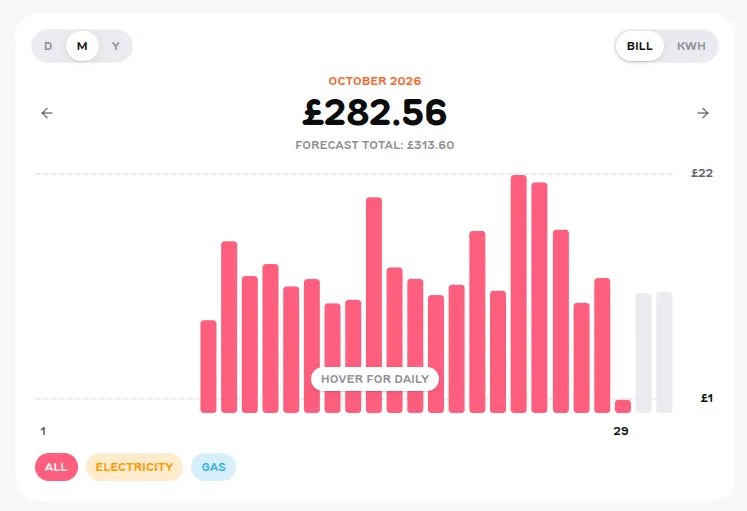
Here you can see a snapshot of my October energy usage from the Fuse Energy dashboard. As you can see, I get a daily total, which I can split into electricity and gas if I need to, and monitor a running forecast total for the month based on my evolving daily energy usage.
I have large peaks and troughs when it comes to my energy usage - some days I actually spent over £20 in a single day, which was as a result of running my underfloor heating for most of the day when I just couldn't get warm. As it happened, I didn't think the house even heated up that much, so I used this data to see what was going on, and I managed to find a pump that was actually switched off - the joys of still learning how a house like this runs - but at least it won't happen again.
There's plenty of settings within the Fuse app that you can make use of, such as managing my direct debit, checking if I'm on the best tariff, and a really cool AI support assistant which actually responds promptly and accurately. So all in all, I actually have a lot of insight and information from just one app that really helps me to stay on top of things.
How do you use your energy provider's app to keep an eye on your bills? Are there any tips and tricks I should know about? Let me know!